

Best AI Powered Coding Assistants in 2026 Compared for Productivity and Security
Overview
Introduction: Why AI-Powered Coding Assistants Are No Longer Optional
The pressure on software developers in 2026 is real. You need to ship features fast. You need to keep quality high. And you need to do it all with fewer resources.

It is a tough spot to be in.
Here is the thing. AI powered coding assistants have moved from being a nice-to-have to a must-have tool. According to recent data, 84% of developers now use or plan to use these tools in their workflow. The results are hard to ignore. Teams using AI consistently report productivity gains between 31% and 55%.
But there is a major catch. Only 29% of developers fully trust the code these tools produce. So you get speed, but you also get risk. That gap between moving fast and staying safe is where many teams get stuck.
This is why choosing the right tool matters more than ever. Whether you are building enterprise software or exploring ai applications like ai powered homework help, you need to know which best ai platforms are actually worth your time.
This guide cuts through the noise. We reveal the top performing ai powered coding assistants of 2026. We share the best learning resources to master them. And we show you the security steps you cannot afford to skip.
For a deeper look at how these tools are reshaping the industry, check out our complete data driven guide on AI software development.
If you want to stay ahead of every new AI trend and funding round, subscribe to The Deep View Newsletter. It delivers clear, daily updates straight to your inbox so you never miss what matters.

Understanding AI-Powered Coding Assistants: From Autocomplete to Autonomous Agents
Let us look back for a second. A few years ago, "AI coding" meant your editor suggesting the end of the line you were typing. Not bad. But not life changing.
Today, in 2026, ai powered coding assistants are a totally different animal. They do not just autocomplete. They understand context. They look at your whole codebase, your comments, and your bug reports. Then they help you fix things.
How did we get here?
It comes down to a few key ai applications working together.
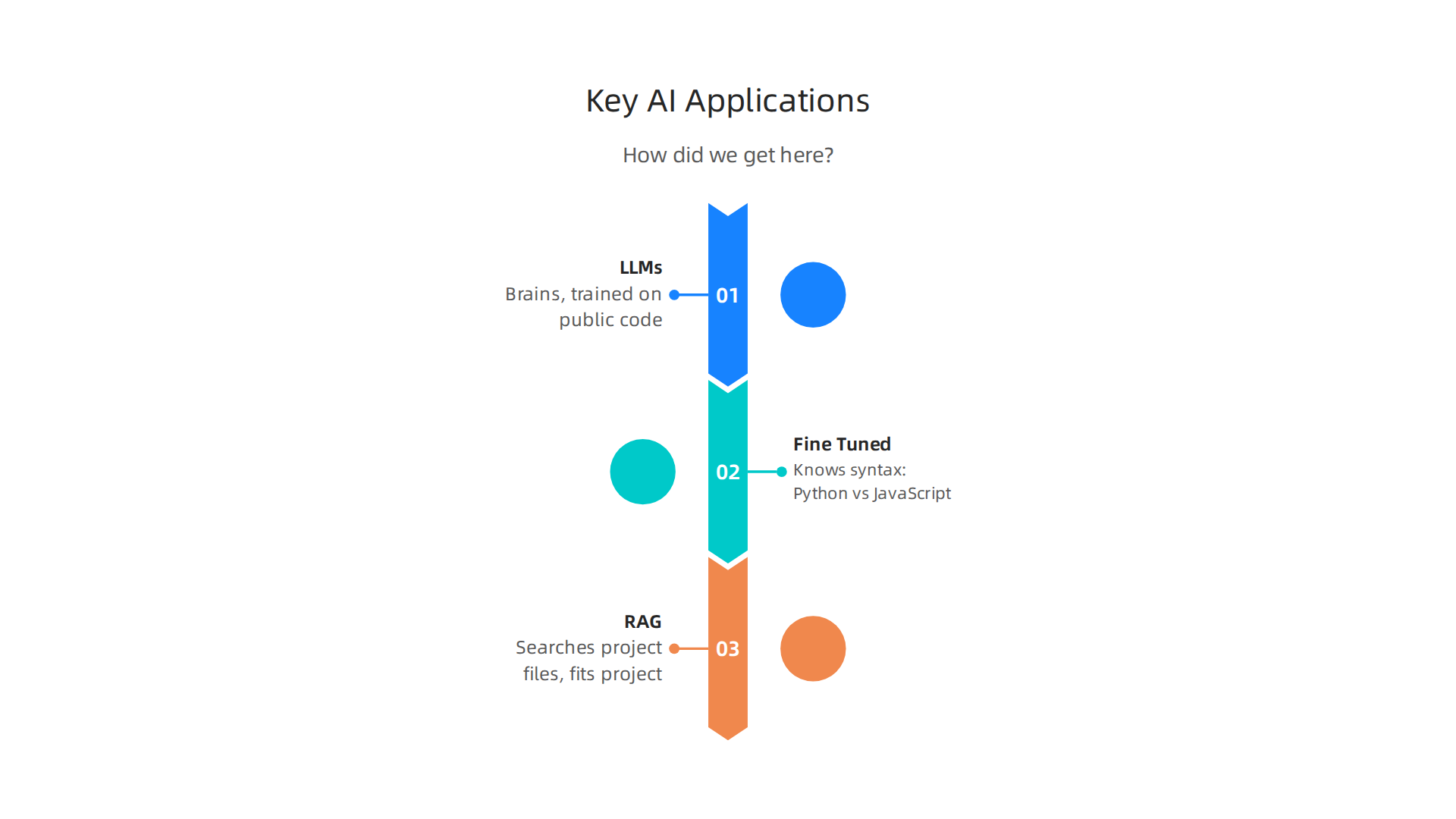
- Large Language Models (LLMs): These are the brains. They are trained on massive amounts of public code. They know patterns, common bugs, and best practices.
- Fine Tuned Code Transformers: A general LLM is okay. A fine tuned code transformer is great. It knows the difference between Python and JavaScript syntax without being told.
- Retrieval Augmented Generation (RAG): This is the secret weapon. RAG lets the tool search your specific project files before it answers. So if you have a unique function in your codebase, the AI knows about it and uses it. This is how we get code that actually fits your project.
What can these tools do today?
The best ai platforms in 2026 handle a lot of the boring stuff.
- Generate full functions from a simple comment.
- Write unit tests for your existing code.
- Refactor messy code into clean, modern syntax.
- Explain complex code to new team members.
- Even write documentation for you.
Think of it like having ai powered homework help for your job. You still need to understand the problem. But the heavy lifting gets a lot easier.

According to SD Times, close to 90% of developers now use these tools daily. We are past the experimental phase. These tools are standard equipment in 2026. For a deeper look at the specific adoption numbers shaping this trend, check out our full data driven guide on AI software development.
Stay Ahead of the Curve
The landscape changes fast. New tools launch every month. To track the best options and avoid the hype, a daily update helps a lot. The Deep View Newsletter delivers clear AI insights straight to your inbox. It is a smart way to stay informed about the ai powered coding assistants that actually deliver results.
The ROI of AI Coding Assistants: Hard Data on Productivity Gains
The tools sound great. But do they actually pay off? The short answer is yes. And the numbers prove it.
Let us look at the hard data. According to controlled experiments, developers using ai powered coding assistants finished tasks up to 55% faster than those working without them Keyhole Software 2026. That is not a small bump. That is nearly double the speed for some tasks.
But speed is not the only story. A wider developer survey found an average productivity increase of 31.4% across the board TrigiDigital 2026. And nearly 89% of engineering leaders say their teams became more productive after adopting these tools MIT Sloan 2026.
Where does the time go?
It is not just about typing faster. It is about fewer distractions. ai applications handle the boring stuff. Things like writing boilerplate code, generating unit tests, and formatting. That means developers spend less time context-switching between files and more time on the actual problem.
One study from SD Times noted that teams saw Time-to-PR (pull request) improvements of 48% to 58%, with full ROI achieved in just one to three months SD Times 2026. Think about that. In less than a quarter, the tool pays for itself.
**Other hidden savings
**
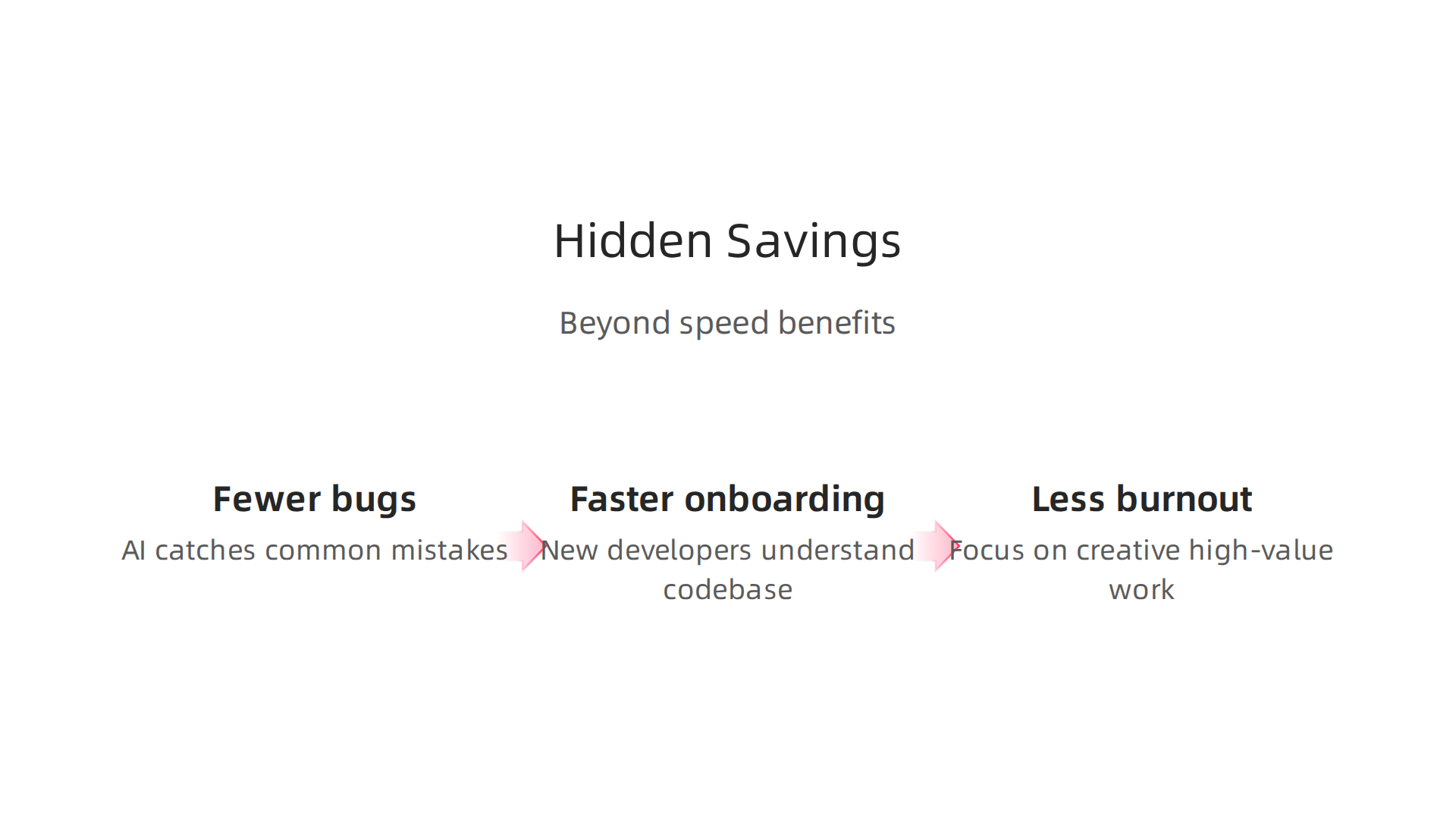
- Fewer bugs. AI catches common mistakes before they become production issues.
- Faster onboarding. New developers can use the assistant to understand the codebase and get up to speed faster.
- Less burnout. When the tedious parts are automated, developers can focus on creative, high-value work.
These benefits compound over time. The best ai platforms in 2026 are designed to fit into existing workflows, so the learning curve is small. For a deeper look at how these tools are reshaping development teams, check out our full guide on AI-powered software development in 2026.
The bottom line
Adopting ai powered coding assistants is not a gamble anymore. The data shows clear productivity gains, real cost savings, and happier developers. If you want to stay ahead of these trends and discover which tools deliver the best ROI, a daily dose of clear AI insights helps a lot.
Get clear daily AI updates from The Deep View Newsletter
Top AI-Powered Coding Assistants Compared: Which Tool Fits Your Stack?
So you’ve seen the ROI numbers. Now the real question: which ai powered coding assistant should you actually use? The truth is, no single tool wins for everyone. Your choice depends on your tech stack, team size, budget, and how much you care about privacy.
Let’s compare the five most popular tools in 2026. We’ll look at what makes each one different and who it’s best for.
| Tool | Best For | Key Differentiator | Pricing | IDE Support |
|---|---|---|---|---|
| GitHub Copilot | General‑purpose coding | 85‑90% accuracy on common languages CheckThat AI | $10‑$19/month | VS Code, JetBrains, Neovim, etc. |
| Amazon CodeWhisperer | AWS developers | Deep AWS service integration | Free tier up to 50k requests | VS Code, IntelliJ, AWS Cloud9 |
| Cursor | Solo developers & fast prototypers | Fork of VS Code with full‑file awareness | $20/month | Built‑in editor (VS Code compatible) |
| Tabnine | Teams that need privacy | Runs locally or in your VPC; no data sent to cloud | $12‑$39/month | 15+ IDEs |
| Codeium | Budget‑conscious devs | Generous free tier with solid completions | Free / $15/month for teams | VS Code, JetBrains, Vim, etc. |
GitHub Copilot is the most well‑known. It supports a huge range of languages and editors, and its accuracy leads the pack at 85‑90% for everyday coding CheckThat AI. If you work in a standard web or backend stack, this is your safest bet.
Amazon CodeWhisperer (now part of Amazon Q Developer) shines if you live inside the AWS ecosystem. It knows Lambda, DynamoDB, S3, and other services by heart. It’s also free for individual use up to a generous limit Whitespace Solutions.
Cursor is a standalone editor (based on VS Code) that can see and edit multiple files at once. It’s great for solo developers who want to refactor or write whole functions without context‑switching Shakudo.
Tabnine focuses on privacy. It can run entirely on your machine or inside your company’s network. No code ever leaves your environment. That makes it a top choice for regulated industries or teams with strict IP rules Techslang.
Codeium offers a very capable free tier. If you’re a freelance developer or a hobbyist who can’t justify a paid subscription yet, Codeium gives you solid autocomplete and chat features at no cost Verdent AI.
How to pick the right one
Here’s a simple way to decide:
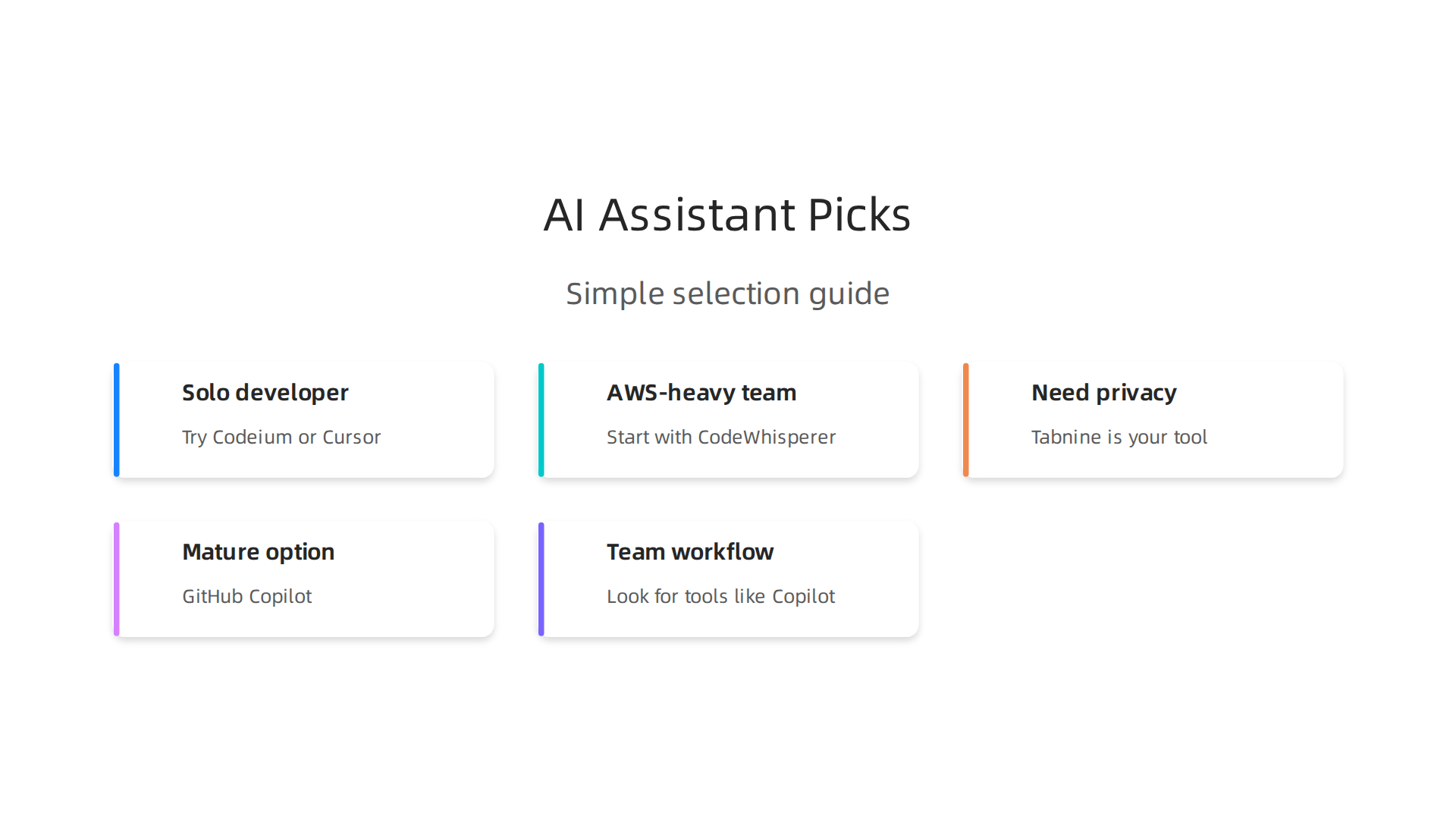
- Solo developer on a personal project? Try Codeium or Cursor.
- Working in an AWS‑heavy team? Start with CodeWhisperer.
- Need ironclad privacy? Tabnine is your tool.
- Want the most mature, widely tested option? GitHub Copilot.
- Building a team workflow? Look for tools like Copilot or Tabnine that offer admin dashboards for policy management.
Remember, you can also combine tools. Many developers use one for autocomplete and another for chat‑based assistance Zemith.
A quick word on learning curves. Most ai applications work inside your existing editor. Setup takes minutes. And the best ai platforms in 2026 have improved chat features that explain code, not just generate it. That helps both beginners and experts.
If you want a broader look at how to evaluate AI tools for your organization, check out our guide on how to choose the right generative AI tools for business in 2026. It covers the same decision‑making process beyond just coding.
The landscape changes fast. New tools pop up, and existing ones get better every month. To stay on top of which ai powered coding assistants deliver real results and which ones are hype, a daily dose of clear AI news helps a lot.
Get clear daily AI updates from The Deep View Newsletter
Learning Tools Supercharged by AI: Accelerating Developer Skills
Picking the right assistant is step one. But here is what makes ai powered coding assistants truly powerful in 2026. They are not just productivity hacks. They are learning accelerators.
The best tools now do more than autocomplete. They teach you. Platforms like GitHub Copilot Chat, Codecademy AI Tutor, and others explain their suggestions. You can ask "why did you do that?" and get a clear answer. This turns your code editor into a personal tutor that works 24/7.

According to the 2026 AI in Learning and Development Report, teams see the biggest gains in personalized learning (72%) and improved learner engagement (56%) Synthesia. That is exactly what these coding assistants provide. They adapt to your skill level, your stack, and your specific question.
Learning new languages and frameworks faster
Need to pick up Rust? Or refresh your Python? Instead of reading documentation for days, you can ask your assistant to generate examples in real time. You learn by doing, with instant feedback. A 2026 survey found that 95% of developers now use AI tools weekly, and 75% use them for half or more of their work Pragmatic Engineer.
This constant practice shortens the learning curve dramatically. For developers looking to skill up for a career change, this is a game changer. Our guide on landing remote entry-level IT jobs in 2026 shows exactly how these skills open doors.
Does it actually improve code quality?
Yes, but with a catch. Research from Anthropic shows that how you interact with your ai applications matters Anthropic. Developers who ask for explanations and review suggestions carefully learn faster and write better code. Those who just copy and paste miss out.
The results speak for themselves. The 2026 AI Index Report from Stanford shows that performance on the SWE-bench coding benchmark jumped from 60% to nearly 100% in a single year Stanford HAI. The best ai platforms are not just generating more code. They are generating better code.
Want a deeper look at which platforms deliver the strongest learning outcomes? See our breakdown of generative AI solutions for business in 2026.
The bottom line for developers
The real value of these tools is not speed. It is growth. They turn coding into a conversation. They give you a safe space to try new things, ask questions, and fail fast. Whether you are a junior developer or a seasoned engineer, this changes how you stay current.
If staying on top of these fast-moving ai powered coding assistants feels overwhelming, a trusted daily source helps cut through the noise. Get clear, curated AI updates delivered straight to your inbox.
The AI Newsletter Worth Reading
Seamless Integration: Embedding AI Assistants into Your CI/CD Pipeline
So you have learned how these tools accelerate skills. Now let us talk about making them work at scale inside your actual delivery pipeline. This is where the real magic and the real risk both live.
The problem is simple. ai powered coding assistants generate code fast. Really fast. According to controlled experiments, developers with AI assistants complete programming tasks up to 55% faster Keyhole Software. But here is what happens next: feature branches multiply, code piles up, and merge conflicts explode. AWS warns that without frequent integration, long-lived branches with AI generated code create a logjam in your delivery pipeline AWS.
The fix? Embed your ai applications directly into CI/CD.
Automated quality gates that actually gate
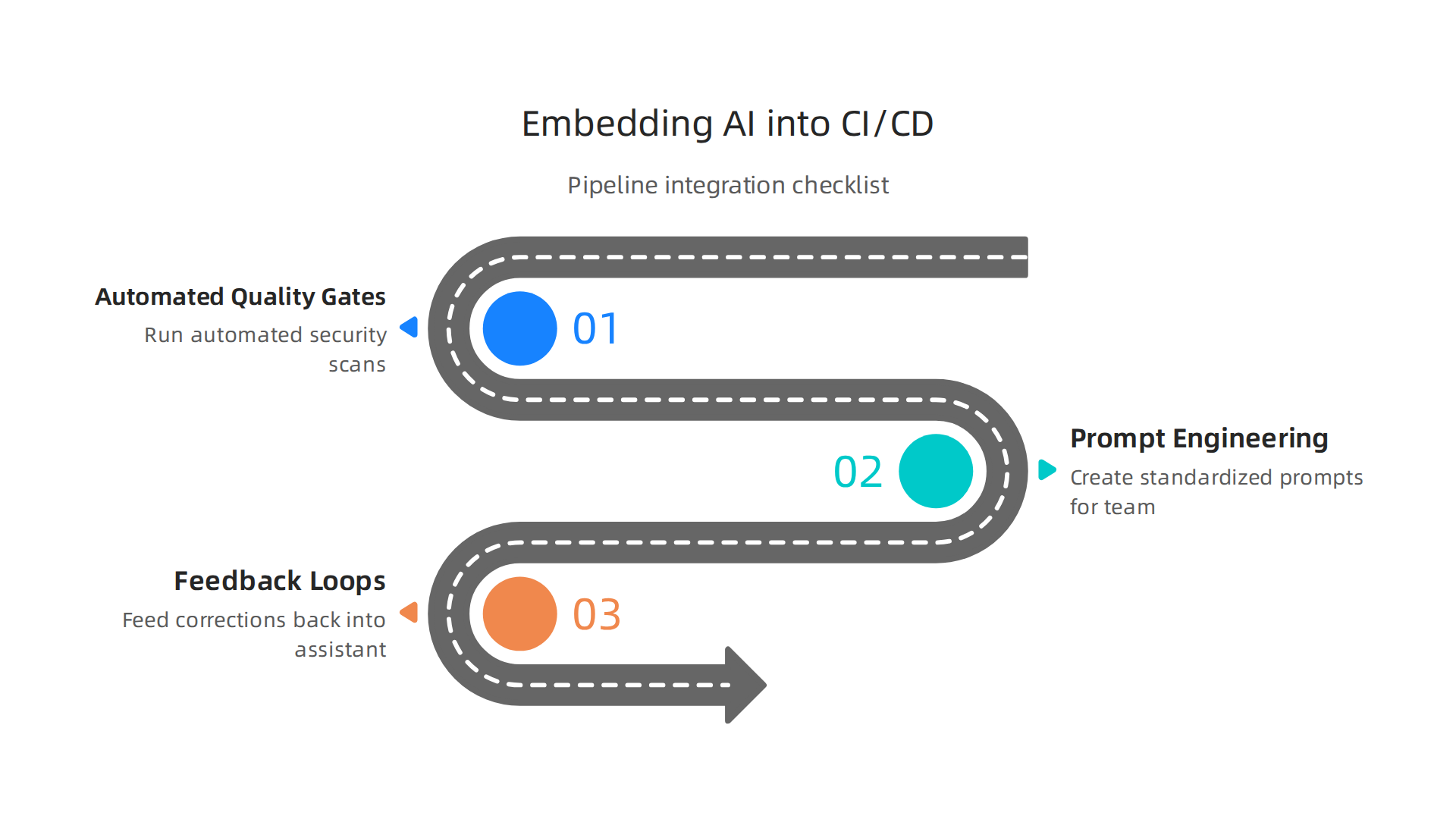
Instead of reviewing every AI suggestion manually, let the pipeline do the heavy lifting. Tools like GitHub Actions with Copilot, Jenkins with CodeWhisperer, and custom GPT agents can run automated security scans on every pull request. The research is clear: AI generated code introduces 15 18% more security vulnerabilities, especially in regulated industries SDTimes. That is why experts recommend integrating security planning and policy checks right into your CI/CD pipelines Entrans AI.
Think of it this way. You let the assistant generate code fast. Then your pipeline immediately checks it for secrets, vulnerabilities, and policy violations.

This keeps speed without sacrificing safety. GitLab explains that properly configured AI code assistants can actually reinforce secure coding standards automatically GitLab.
Prompt engineering and feedback loops
Here is the part most teams miss. You cannot just plug in an assistant and walk away. You need to train it.
Create standardized prompts for your team. For example, a prompt like "generate a Python function that validates user input and follows OWASP best practices" produces far better results than a vague request. Then build a feedback loop. When the pipeline flags an issue, feed that correction back into your assistant’s context. Over time, the assistant learns your team’s standards.
This matters because trust is low. Only 29% of developers fully trust AI coding output Uvik. With the right feedback loops, that number goes up. Your best ai platforms improve with every review cycle.
The bottom line for CI/CD teams
Integrating AI into your pipeline is not optional anymore. It is how you keep pace. Teams that do this well see Time to PR improvements of 48 58% with ROI achieved in just one to three months SDTimes. But the teams that skip the integration? They drown in unchecked code and security debt.
If you are setting up your own development stack in 2026, understanding how these pieces fit together makes all the difference. For a complete look at which tools deliver real results, check out our guide on generative AI solutions for business in 2026.
And if staying current with the fast moving AI landscape feels like a full time job, let someone else curate the signal from the noise. Get clear, daily AI updates delivered straight to your inbox.
The AI Newsletter Worth Reading
Navigating Security, Quality, and Ethical Concerns
Using AI powered coding assistants without a safety net is like driving a fast car with no brakes. The speed is great until you crash. Research shows that AI generated code introduces 15 to 18 percent more security vulnerabilities than human written code SDTimes. And it is not just about bugs. Licensing issues can pop up when the AI copies code from open source projects that have strict rules. Bias is another hidden risk: the training data may contain unfair patterns that end up in your application.
So what do you do? You validate everything. That means combining automated tools with human eyes.
Smart validation: machines catch, humans decide
Start with static analysis tools that scan every line of AI generated code for security flaws. Services like Checkmarx specialize in finding vulnerabilities in code written by any assistant
Checkmarx. Run unit tests automatically on every pull request. Then have a human review the most critical parts. The experts at Digital Applied say that AI generated code needs enhanced review procedures that go beyond normal peer review Digital Applied. Do not skip this step.
Also, set up quality gates that enforce coding standards. GitLab explains that properly configured AI assistants can reinforce secure coding habits automatically GitLab. That means the tool learns your safety rules over time.
The ethics of automation
Here is what many teams miss. When you lean too hard on AI, junior developers stop learning the hard parts. They accept suggestions without understanding why. A recent study found that AI coding assistants shift security thinking from writing code to reviewing code arXiv. That is good for experienced devs, but newer team members may miss out on deep learning. Be transparent about where you use AI. Give credit to human contributors. And make sure everyone on the team knows how to question the assistant’s output.
The balanced approach
You can have speed and safety together. It just takes discipline. For a complete playbook on building secure AI powered systems, check out our guide on AI powered software development in 2026.
And if you want to stay ahead of the latest security best practices without the research headache, let someone else keep you informed. Get clear daily updates on AI tools and trends delivered straight to your inbox.
The AI Newsletter Worth Reading
Future Trends: What’s Next for AI in Coding and Developer Education?
The world of AI powered coding assistants is moving fast. Really fast. In 2026, close to 90% of developers use these tools daily SDTimes. And 41% of all new code is written by AI Exceeds.ai. But what comes next? Let me show you three big trends that will shape the next year.
Autonomous agents that fix their own mistakes
The first big shift is toward autonomous AI agents. Instead of just suggesting code, these agents can plan, write, test, debug, and fix their own work across multiple steps. Think of it like having a junior developer who learns from every mistake without you telling them twice. Companies like Cognition raised over $1 billion in 2026 for an agent that already writes 89% of the company’s own code TechFundingNews. That kind of self-correction is a game changer.
Specialized models for your specific codebase
The second trend is specialization. In 2026, the best AI platforms are no longer one-size-fits-all. New models are fine-tuned on specific codebases, industries, or even company style guides. A healthcare startup can use an assistant trained on HIPAA-compliant code. A fintech team can get a model that knows banking APIs inside out. This makes the output safer and more accurate from the start.
One platform for coding and learning
The third trend is the convergence of coding assistants and learning tools. Instead of switching between an IDE and a tutorial site, developers will use unified platforms that coach them as they code. Newer team members get instant explanations for every suggestion. Seasoned devs get deeper insights without leaving their editor. It is like having a mentor built into your workflow. This is especially important as 84% of developers now use or plan to use AI tools Keyhole Software.
What this means for you
The future of AI powered coding assistants is not just about faster code. It is about smarter, safer, and more personalized help. And it changes how we learn to build software. If you want to keep up with these shifts without spending hours reading every report, there is an easier way.
Get clear daily updates on the best AI platforms and trends delivered straight to your inbox.
The AI Newsletter Worth Reading
Summary
This article explains why AI‑powered coding assistants have become essential for modern software teams and how to use them safely and effectively. It covers how these tools evolved from simple autocompletion to context‑aware systems that leverage LLMs, fine‑tuning, and RAG to read your codebase, generate functions, write tests, and teach developers. You’ll see hard ROI data (task speedups up to 55% and average productivity gains around 31%), a practical comparison of the top tools in 2026, and guidance for picking the right assistant based on stack, privacy, and team needs. The guide also shows how to integrate assistants into CI/CD with automated quality gates and feedback loops, plus the security, licensing, and ethical checks you must add to keep risk low. Finally, it outlines future trends like autonomous agents and specialized models so you can plan adoption and training for your team.